Email:
 Phone:
 WhatsApp:

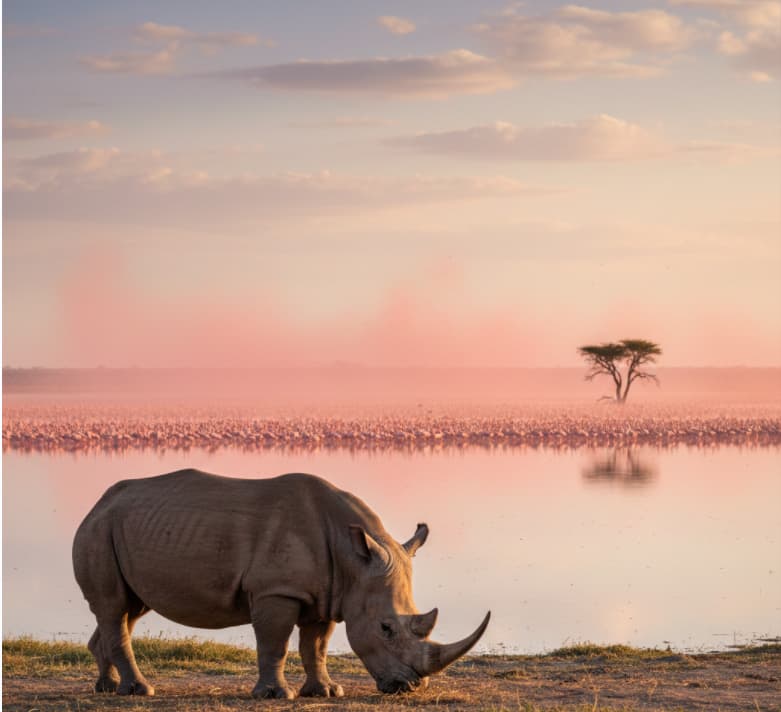
Lake Nakuru National Park is now 100% cashless. As a Premium Park, all visitors are now required to follow a strict KWS cashless policy for entry. This means you cannot pay with cash at the gate; instead, you must know how to pay Lake Nakuru park fees on eCitizen before you arrive.
This digital shift ensures a more secure and efficient Lake Nakuru gate payment process. By using the official KWS payment link 2026 (kwspay.ecitizen.go.ke), you can generate your e-ticket in advance, allowing you to breeze through the entrance and start your safari without delay.
IMPORTANT : To pay Lake Nakuru fees in 2026, log in to KWSPay eCitizen, select “Lake Nakuru National Park,” enter your guest details, and settle the amount via M-Pesa or Card. Keep your QR code screenshot ready for scanning at the gate.
🔽Use the tabs below to explore different sections of this Lake Nakuru Fee Payment guide.
To avoid technical delays or session timeouts on the portal, you must have your documentation ready before you begin. Knowing how to pay Lake Nakuru park fees on eCitizen starts with proper preparation—especially if you are visiting during the peak safari months when system traffic is at its highest.
To ensure a smooth transaction, gather these safari group details beforehand:
- eCitizen login credentials: Ensure you have your username and password active.
- Identification: You will need a valid Kenyan ID for citizens or an original passport for non-residents.
- KWS vehicle registration details: If you are self-driving, have your car’s plate number and seating capacity ready.
- Payment Method: Ensure your M-Pesa or card is loaded with enough funds to cover the entry fees plus the 5% administrative fee.
Having these details on hand is the best way to prevent the system from timing out while you are at the gate.
Knowing how to pay Lake Nakuru park fees on eCitizen is simple once you navigate to the correct 2026 digital portal. Follow these numbered steps to secure your entry:
- Access the Portal: Log in to the official KWSPay eCitizen portal.
- Start Your Application: On the main dashboard, go to the search bar and type: Lake Nakuru National Park.
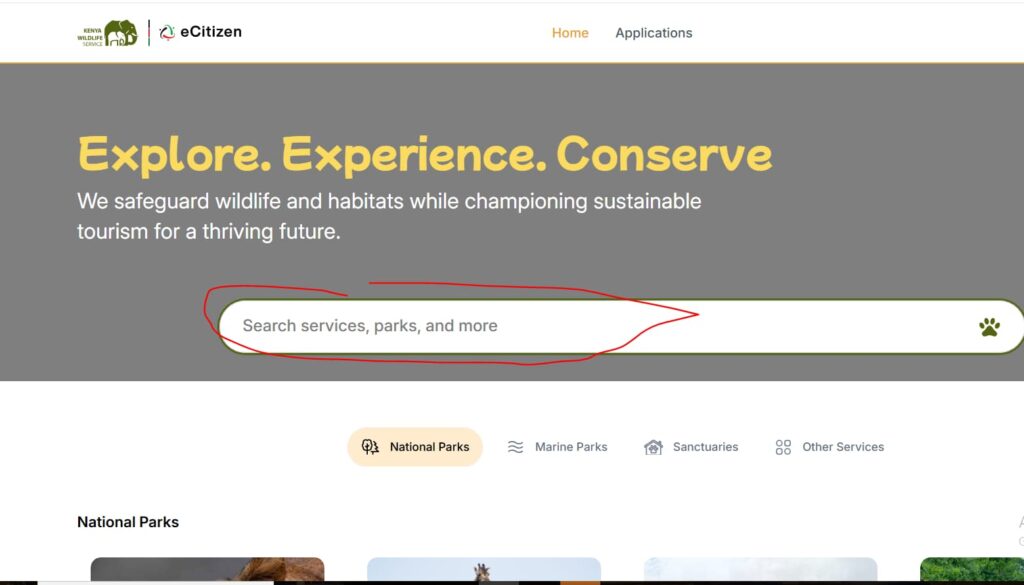
3. Choose Your Park: Use the search bar or scroll down to [select Lake Nakuru National Park] from the list of premium destinations.
4. Enter Visitor Data: Input the names and document numbers for your party. It is critical to select the correct [KWS visitor categorization] (Citizen, Resident, or Non-Resident) as fees vary significantly between groups.
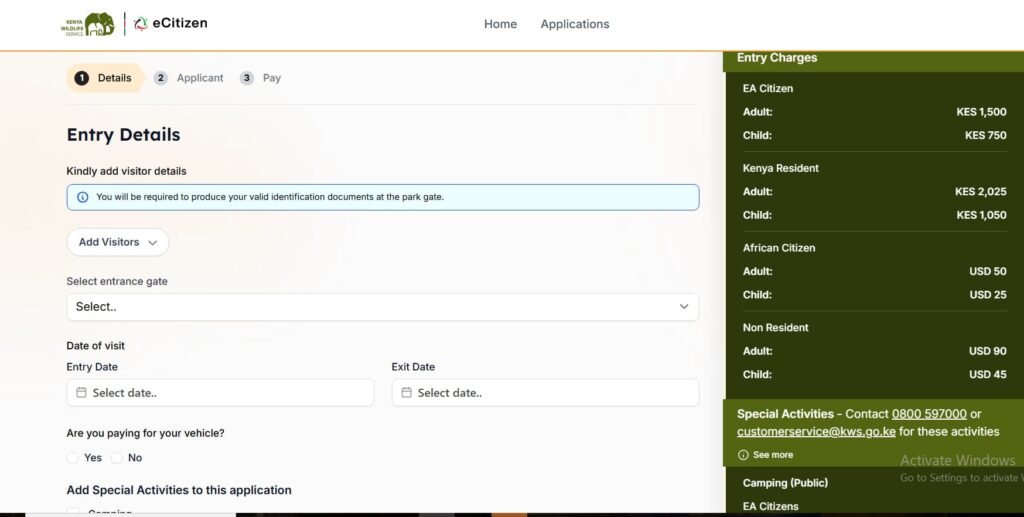
4. Vehicle and Extras: If you are driving your own vehicle or planning a night drive, add these under “Vehicle Details” or “Special Activities” before checking out. See our guide on Lake Nakuru self-drive rules so that you don’t find yourself on the wrong in the park.
5. Settle the Total: Complete your payment. Most users find the M-Pesa STK push the most convenient, but you can also use a credit card.
6. Get Your Permit: Once the transaction is successful, click to [download KWS e-ticket].
7. Prepare for the Gate: Immediately [screenshot the QR code for park entry] once you arrive at the Lake Nakuru National Park.
⚠️Why the Screenshot Matters: Mobile network signal at the Lake Nakuru Lanet and Main gates can be unreliable. Rangers must scan your [QR code for park entry] to grant access, and having it saved in your phone’s gallery ensures you aren’t stuck waiting for a webpage to load.
Understanding how to pay Lake Nakuru park fees on eCitizen requires knowing the available payment channels and the additional government costs. As from 2026, the KWSPay system has standardized these options to ensure all transactions are secure and trackable.
1. M-Pesa (The Fastest Option)
Most local visitors prefer using mobile money. Once you click “Pay,” you can choose:
eCitizen M-Pesa STK push: Enter your phone number on the portal, and a pop-up will appear on your phone asking for your M-Pesa PIN.
KWS Paybill 222222: If the STK push fails, use the manual Paybill option. Enter 222222 as the Business Number and use the unique “Account Reference” generated by the portal as your account number.
2. Credit and Debit Cards
International tourists can pay KWS fees via Visa/Mastercard directly through the portal. While convenient, be aware that your bank may charge a small international transaction fee. Payment confirms your entry, but it doesn’t guarantee your comfort inside the park’s harsh ecosystem. Once you have secured your digital ticket, your next hurdle is protecting your equipment from the park’s corrosive “soda dust” and managing the high-altitude UV glare. To ensure your smartphone stays charged for the mandatory exit scan and your gear survives the “Alkaline Mirror” effect, consult our updated Lake Nakuru Safari Packing List before you head to the gate.
3. Mandatory Additional Costs
When calculating your total, keep in mind these two critical financial factors:
- 5% eCitizen gateway fee: A mandatory administrative charge is added to every transaction. For example, if your park fee is KSh 1,500, the system will add KSh 75 as a gateway fee.
- Central Bank of Kenya USD exchange rate: For non-resident fees (quoted in USD), the portal applies the prevailing Central Bank of Kenya USD exchange rate for that month.
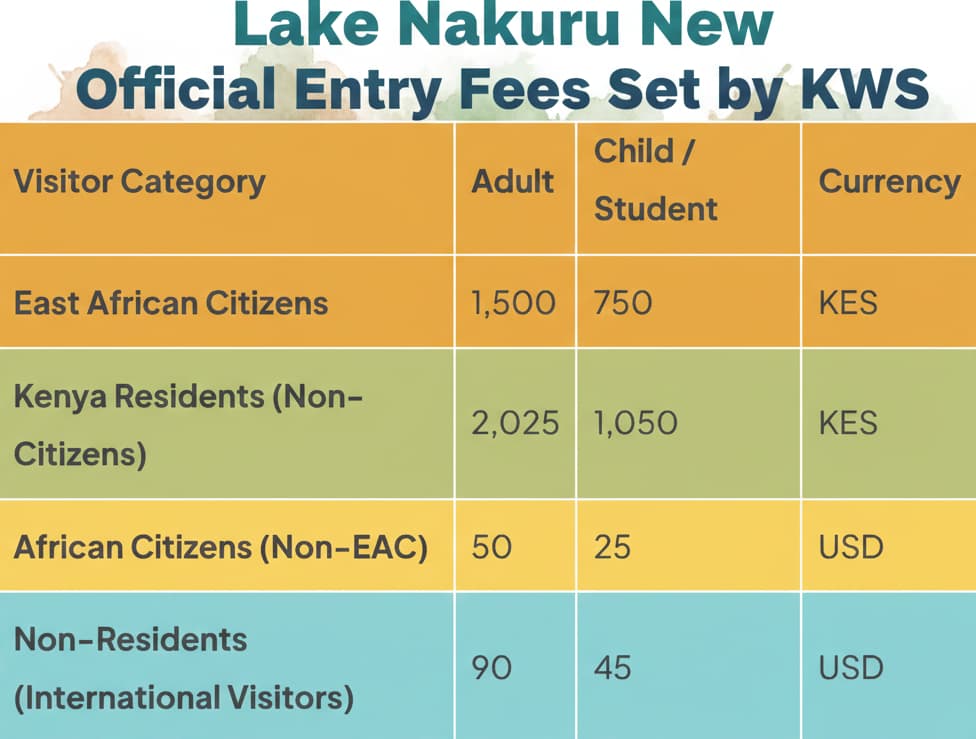
Before you proceed with your payment, use this quick-glance table to verify the total amount for your group. Understanding how to pay Lake Nakuru park fees on eCitizen correctly starts with selecting the right conservation tariff for your residency status.
2026 Conservation Fees (Per 24 Hours)
The [KWS adult vs child rates] are based on age, with children (5–17 years) typically paying 50% of the adult fee. Children under 5 years of age enjoy free entry.
Vehicle Entry Charges 2026
In addition to individual fees, you must include your [vehicle entry charges 2026] in the same eCitizen transaction. These are billed per 24-hour entry:
Less than 6 seats: KSh 600
6–12 seats (Safari Vans): KSh 1,500
13–24 seats (Minibuses): KSh 3,000
👉Looking for more? This section covers the basic entry costs. For a deep dive into every possible expense—including camping rates, aircraft landing fees, and special activity costs—check out our comprehensive guide on Lake Nakuru National Park Entry Fees: All Requirements & new Tariffs.
If you have booked a stay at luxury lodges like Sarova Lion Hill Game Lodge, Lake Nakuru Lodge, The Cliff, or Lake Nakuru Sopa Lodge, the standard payment process on eCitizen has a few critical nuances.
To ensure a smooth “Check-in” and “Check-out” experience, follow these new guidelines on how to pay Lake Nakuru park fees on eCitizen when staying overnight:
1. The 24-Hour Rule for Overnight Stays
Currently, KWS strictly enforces the 24-hour ticket validity rule. Unlike some parks that charge per “calendar day,” your Lake Nakuru entry permit is valid for exactly 24 hours from the moment your QR code is scanned at the gate.
Example: If you enter at 2:00 PM on Monday, your ticket remains valid until 2:00 PM on Tuesday.
Multi-Day Stays: If you are staying for two nights, you must select “2 Days” in the quantity section of the KWSPay portal. Do not try to pay for the second day separately at the gate later—cash is not accepted!
2. Pre-Paying for Lodge-Specific Activities
Many guests staying inside the park want to experience the famous Night Game Drives, which are a highlight of the Nakuru experience.
The Cost: This is categorized as a “Special Activity” and is not included in your standard entry fee.
The Process: When navigating how to pay Lake Nakuru park fees on eCitizen, look for the “Special Activities” tab. Select “Night Game Drive.” The 2026 rates are KES 3,000 for Residents and USD 50 for Non-Residents.
Important: You must present a separate QR code for this activity to your lodge guide before the drive begins.
3. Vehicle Entry Fees for Lodge Guests
If you are driving yourself to the lodge, your Vehicle Entry Fee (KES 600 for small cars / KES 1,500 for safari vans) must be included on the same eCitizen invoice as your guest fees. To ensure a smooth arrival, check our guide on which Lake Nakuru gate to use based on your lodge’s location, your location, and current road conditions.
Option 2: The “Traveler’s Shortcut” (Short & Punchy)
Pro Tip: If the lodge is picking you up at the gate in their own vehicle, clarify with them beforehand if they have covered their own vehicle fees. In this case, you only need to present your personal e-tickets.
4. Mandatory Exit Validation
Before you leave the park via the Main Gate or Lanet Gate, KWS rangers will scan your QR code one last time to “check you out.”
Avoid Penalties: If you have overstayed your 24-hour window without a valid “Day 2” payment, the system will flag you. You will be required to log back into eCitizen at the gate to settle the balance before the barrier is lifted.
The Fix: Always double-check your “Entry Time” on your digital receipt and plan your exit to coincide with your 24-hour window.
Even with a streamlined digital system, technical hitches can occur at the park gates. If you are struggling with how to pay Lake Nakuru park fees on eCitizen, use these verified solutions to resolve the most common 2026 payment issues:
- [KWSPay payment pending]: If your M-Pesa has been debited but the ticket status hasn’t updated, do not pay again. Click the “Refresh” or “Complete” button on the portal. If the status remains stuck, navigate to the [verify eCitizen payment] tool on the dashboard to manually sync your transaction.
- [eCitizen payment not reflecting]: This often happens due to a delay between the mobile network and the government gateway. Wait 2–3 minutes, then check your “Application History.” If it still doesn’t show, ensure you didn’t accidentally close the browser window before the “Success” message appeared.
- Missing STK Push: If the PIN prompt doesn’t pop up on your phone, use the manual [KWS Paybill 222222]. Enter your unique Trip Reference Number as the Account Number to link the payment to your e-ticket.
- Connectivity Problems: ⚠️ [Lake Nakuru gate Wi-Fi] is typically available for public use at the Main Gate (Old Main Gate) and Lanet Gate. If your mobile data is weak, ask the KWS rangers for the “eCitizen Hotspot” credentials to finalize your permit.
- Real-Time Assistance:📞 For persistent system errors or refund queries, message the [KWS customer service WhatsApp] at +254 726 610509 or call the toll-free line at 0800 597 000.
🏁 Final Checklist: How to pay Lake Nakuru park fees on eCitizen
Mastering how to pay Lake Nakuru park fees on eCitizen is the final step in ensuring your safari is as smooth as the lake’s surface at dawn. By understanding the digital transition and the strict 2026 entry protocols, you can bypass administrative delays and focus on the park’s world-famous rhino sanctuary and birdlife.
Final Safari Planning Hacks
- The [KWS 24-hour ticket rule]: Your entry fee is valid for exactly 24 hours from the moment your [QR code for park entry] is scanned at the gate. If you are staying overnight in a lodge or campsite, ensure your exit time aligns with your entry time to avoid being charged for a second day.
- [Single entry vs annual pass]: For most travelers, the single-entry ticket is the standard. However, if you plan on visiting Lake Nakuru and other premium parks more than five times a year, look into the 2026 KWS Annual Pass (approx. KSh 45,000 for citizens) available on the kwspay.ecitizen.go.ke dashboard.
- [Lake Nakuru safari planning tips]: Always download your e-ticket as a PDF and take a screenshot. Relying on “live” data at the gate is risky, as mobile network signal can be intermittent.
Having your QR code ready is only half the battle. In 2026, the most common reason travelers miss their “24-hour window” isn’t a payment error—it’s the Rironi–Mau Summit highway construction.
Before you turn the key, make sure you have the latest logistical “hacks” to ensure you actually arrive at the gate on time:
- The Transit Guide: Read our Nairobi to Nakuru 2026 Travel Guide for current matatu fares, road construction bypasses, and the “Lanet Gate” shortcut that saves you an hour of city traffic.
- The Deep Dive: For a full breakdown of wildlife spots and seasonal secrets, head over to The Ultimate Lake Nakuru National Park Guide .